The Best Shopify Product Configurator Is the One Without Apps
Product configurators matter for complex or personalized products, but they still aren’t getting easier to build. And “product configurator” can mean a lot of things. Sometimes it’s a product with a huge number of combinations. Other times it includes text input for engravings, file uploads, add-on components, or guided flows where early choices change what comes next.
On Shopify, the biggest constraint has long been the limit of three options per product. Higher variant limits help a bit, but they don’t fix the core issue. Shopify still doesn’t offer an out-of-the-box way to manage dozens of component choices or conditional selections.
For years, the standard workaround has been a third-party apps or a custom system backed by an external database. Both can work, but they come with tradeoffs.
At Commerce-UI, we’ve built dozens of product configurators. During our work on Lupine Lights, we decided to go fully Shopify-native. The results were strong enough that we now see this as the default approach for most configurator builds on Shopify. This article explains why, and breaks down what separates a configurator that works from one that’s genuinely great.
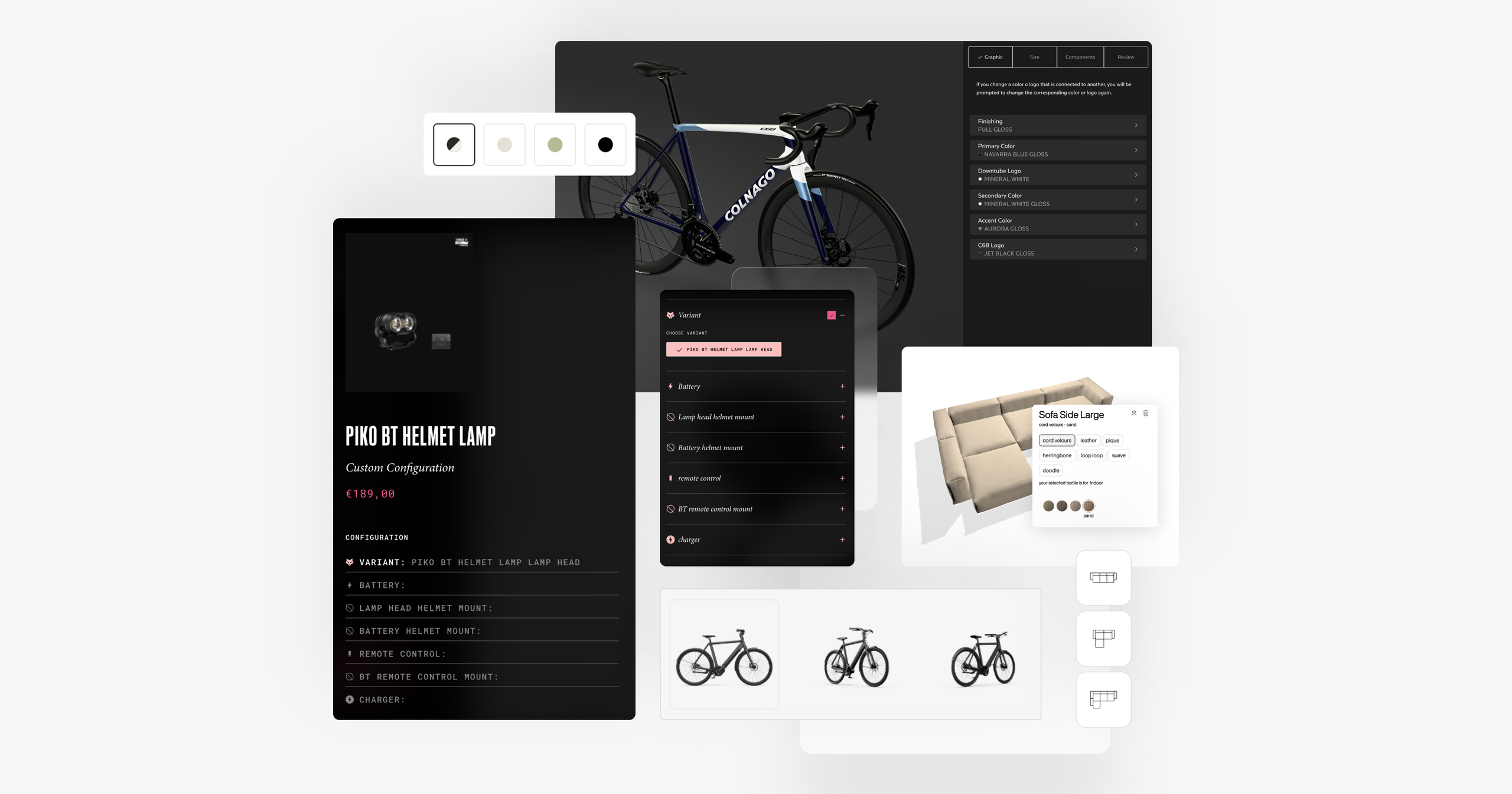

What Makes a Great Product Configurator
Context-Aware Dynamic Pricing
A great configurator can’t treat pricing as a static label. The moment a store supports B2B terms, international markets, or customer-specific entitlements, the configurator has to calculate and show the right price for this shopper as options change.
That means pricing has to be both contextual and dynamic:
- B2B context: Logged-in wholesale buyers often see different price tiers, discounts, or net pricing than retail shoppers. The configurator needs to reflect that instantly as they configure.
- International Markets context: Prices can change by market due to local currency, rounding rules, and market-level adjustments. The configurator should apply those rules in real time, not “later.”
- Tax display context: Some regions expect tax-inclusive pricing, others expect tax-exclusive. The configurator has to match the store’s regional tax display so the number the customer sees stays consistent.
A strong implementation keeps pricing aligned across: PDP (as selections change), Cart (as quantities and add-ons update), and Checkout (final totals)
Component-Level Inventory Management
If you build a configurator by turning every possible combination into a product, you hit SKU explosion fast. You end up creating (and maintaining) thousands of SKUs just to represent choices that are really just mixes of the same underlying parts. A great configurator avoids this by tracking inventory at the component level (the actual pieces that make up the final configuration) rather than at the bundle level.
That way, when someone buys a custom setup, Shopify deducts inventory for the exact components they selected, without you needing to predefine every combination as a static variant. It’s cleaner operationally, and it keeps merchandising flexible because you can add or remove components without rebuilding a giant variant matrix.

↑ OakyWood's real-time desk customizer.
Dynamic Cart and Checkout Bundling
Once you track inventory at the component level, you hit the next challenge: keeping the buying experience simple. Customers don’t want to add “battery, mount, strap, charger…” and end up with a grocery list of parts in the cart.
In practice, that means bundling multiple component SKUs into a single logical cart item: one title, one thumbnail, one clear “your configuration” summary, and one set of controls. If the cart looks messy, the purchase feels risky.
A strong implementation also gets the practical details right:
- Unified quantity management. Shoppers adjust quantity once, and the system scales the underlying components correctly. (If one configuration = 1 headlamp + 1 battery + 1 mount, then quantity 2 deducts each component ×2.)
- Discounts that “just work” and stay visible. Whether the discount applies to the whole configuration or specific components, the customer should see it clearly reflected in the bundled line item and carried through consistently into checkout
The end goal is simple: operations see the parts, customers see the product with clean quantity controls and predictable discounting from PDP through checkout.
Performance
Configurators are uniquely sensitive to performance. Every click is a decision point, and if the UI hesitates, people lose confidence, abandon the flow, or start second-guessing their choices.
With a Shopify-native approach, you can render most of the experience server-side in Liquid. That means the page loads with real content in place, instead of waiting for a third-party script to fetch data and “paint” the UI after the fact. App-based configurators often rely on client-side loading, which can cause flicker, layout shifts, and that moment where the page looks ready but isn’t.
It also helps that Shopify’s core APIs are built for speed and scale. When your configurator logic and data live inside Shopify (metafields, metaobjects, product data), you’re leaning on an infrastructure that’s generally faster and more reliable than an external app stack—especially during traffic spikes.
Finally, owning the UI matters. When you control every interaction, you can design for “snappiness”: optimistic updates, instant visual feedback, preloaded states, and transitions that make changes feel immediate. You’re not working around someone else’s components. You can build the shortest path from click to confirmation.
Editor-Friendly configuration
Editor-friendly configuration means your Shopify back office works for the people who actually run the catalog. So the backend architecture needs to work for non-technical people: merchandisers, marketers, and product specialists should be able to update configuration logic and content without waiting on developers.
The benchmark is simple: a non-technical person should be able to launch a new product configuration end-to-end. Developers should only be needed when the underlying capability changes, like new input types, new validations, not for routine merchandising work.
Live Preview
Live preview is where a configurator earns trust. When shoppers see the product change in real time, options stop being abstract labels and become concrete items. That clarity reduces hesitation, lowers the “surprise factor,” and keeps momentum through the shopping journey.
Live preview can be done in 2D or 3D, and both are valid, but they shine in different scenarios:
- 2D live preview (layered images) is often the fastest and most photorealistic option for surface-level customization (colors, prints, text placement).
- 3D live preview is increasingly common because engines and pipelines have improved dramatically, and the experience can scale better for modular products. A single 3D model can encapsulate permutations through materials, parts, and rules, whereas 2D often requires either a large library of pre-rendered assets or extremely precise layering/alignment workflows that can limit fidelity as complexity grows.
Shopify also endorses 3D live previews. For example, Gunner Kennels used Shopify’s 3D/AR to let customers place a life-size kennel in their space. Shopify reports a 40% increase in conversion rate and a 5% reduction in return rate.
AR is especially valuable for products with meaningful dimensions or a clear “home context” (furniture, lighting, home gym gear, kennels), because it turns “I think it fits” into “I can see it fits”, which is exactly what a great configurator should do.

↑ Colnago bike configurator with 3d live preview
Rich Content and Guided Decision-Making
Great configurators have to serve two very different audiences at once: high-intent shoppers who already know what they want and want to move fast, and lower-intent shoppers who need guidance, reassurance, and context.
The best experiences add guidance only when it’s useful: tooltips that explain tradeoffs, “what’s the difference?” comparisons, short recommendations (“most popular”, “best for X”), and step-by-step prompts that turn a complex build into a clear path. Done well, this reduces choice overload and makes decisions feel safer without adding friction.
The content also has to be editable (tying back to editor-friendly configuration). If merchandisers can update copy, reorder modules, add help text, and refine comparisons without a deploy, the configurator can improve continuously based on real customer questions, support tickets, and product changes.
Rich content isn’t fluff. It’s how you guide people through complexity, without slowing down the experts who just want to buy.

↑ Lupine's guided bike light configurator in action.
Shopify-Native Configurator Architecture
Now that we’ve defined what “great” looks like, the question becomes: how do you build it on Shopify without fighting the platform?
At the center of a Shopify-native architecture are Metaobjects—Shopify’s structured content system (definitions + entries) that can be edited in the admin, accessed via APIs, and rendered directly in themes via Liquid. Practically, you model each configurator as a metaobject entry (think: Configurator) and have it reference other metaobjects that represent the building blocks—modules, steps, and options. Shopify explicitly supports this pattern via metaobject references (metafields that point from a product to a metaobject entry, or from one metaobject entry to others), which is what gives you the reusable “configuration tree” structure.
This structure also unlocks input types far beyond Shopify’s classic product options: each “Configurator Option” can be typed (e.g. select, text input with character limit, file upload, etc.) and backed either by products/variants (for purchasable components) or by metadata (for UX-only selections). Because the configuration is represented as data and not hardcoded branching, you can reuse the same modules across multiple product lines (and editors can maintain them without deployments).
For dynamic UX (live preview updates, price refresh, progressive disclosure for huge trees), a strong pattern is pairing Liquid rendering with the Section Rendering API. Shopify’s Section Rendering API lets you fetch the HTML for one or more theme sections over AJAX and swap them into the DOM, so you can update UI without duplicating business logic in client-side JS templates. In other words: Liquid remains the source of truth for rendering rules, while the browser only orchestrates partial re-renders.
State management matters too. A practical approach is to serialize the current configuration into the URL (often a compact payload in the querystring or hash), so configurations are shareable, bookmarkable, and resilient to refresh/back navigation. That also makes QA and customer support dramatically easier (“send me the link to your build”).
On the operational side, Shopify Flow can help keep configuration data inside Shopify. Flow is designed to automate store processes using triggers/conditions/actions, and it’s often useful for syncing or transforming “logic tables” that would otherwise live in spreadsheets or external databases.
Finally, Shopify Functions let you enforce correctness at the cart/checkout layer. For “bundle-like” configurators, the Cart Transform Function API can merge multiple cart lines into a single bundle line (or expand a bundle into components), and can also override presentation like title/image/price—exactly what you need to avoid the cart becoming a parts list. For guardrails, the Cart and Checkout Validation Function API lets you run server-side validations across cart and checkout steps and return targeted error messages if a configuration is invalid.
Put together: metaobjects define the configuration model, Liquid renders it, Section Rendering keeps it dynamic without logic duplication, Flow helps operationalize the data, and Functions make cart/checkout behave like a single coherent product while still respecting component-level reality.

↑ Shopify-Native Configurator Architecture
Native vs. third-party solutions
A Shopify-native configurator is a strong fit for most real-world scenarios, even complex ones. If you can express your configurator as a mix of structured data (metaobjects), and cart/checkout enforcement (Shopify Functions), you get a solution that’s faster, easier to maintain, and more “Shopify-shaped” than an embedded app.
Why native wins in many cases
- Performance and UX control: You own the rendering model and can keep the experience server-first, avoiding heavy client-side widgets, layout shifts, and iframe limitations.
- Data ownership and portability: Configuration logic lives inside Shopify (metaobjects, metafields, products), not in a vendor database. That matters for reporting, migrations, and long-term maintainability.
- Cleaner operations: Component SKUs, inventory, context-aware pricing (B2B/Markets), and checkout logic can be enforced using Shopify primitives—so fulfillment sees the right parts while customers see one coherent product.
- Editor workflow: Non-technical teams can maintain trees, modules, copy, and ordering in the admin instead of relying on a vendor UI or developer deployments for routine changes.
When a third-party is the better choice
Native starts to struggle when the problem stops being “configuration for commerce” and starts looking like full CPQ (Configure–Price–Quote) or manufacturing automation, for example:
- extremely complex rule engines (hundreds or thousands of constraints, dependencies, exclusions, guided selling logic owned by sales ops)
- quote workflows (approvals, negotiated pricing, multi-year contracts, regional sales rules)
- deep integration requirements (ERP-driven BOM generation, lead-time calculation, plant capacity, dealer networks)
- highly specialized visualization pipelines or CAD-driven configuration where the configurator is effectively its own product
A practical decision matrix
- Choose native when you need speed, design freedom, Shopify-first operations, and an editor-friendly system.
- Choose third-party/CPQ when you need enterprise quoting and approvals, very large constraint graphs, or manufacturing-grade configuration logic maintained outside the e-commerce team.
- Choose a Shopify App when you need to launch fast, and the configurator isn’t core to your store’s buying experience. Apps make sense if customization is a side feature, the UI can be “good enough,” and you’re okay trading some performance and design flexibility for shorter time-to-market and less engineering work.
Conclusion
In most Shopify stores, the “best” product configurator is the one that feels fast, trustworthy, and easy to run six months after launch.
Apps and external databases can work, but they often push merchandising logic outside Shopify, add performance and UX constraints, and make you dependent on someone else’s roadmap. A Shopify-native approach flips that by keeping configuration data inside Shopify.
The real advantage isn’t “no app fees.” It’s owning the system end-to-end, so pricing stays consistent from PDP to checkout, inventory reflects the actual parts sold, the cart doesn’t collapse into a parts list, and merchandisers can maintain the model without constant engineering cycles.
If your use case truly needs CPQ or manufacturing-grade rule engines, third-party tooling can still be the right choice. But for most complex customizable products, a native build gives you the best mix of performance, flexibility, and long-term maintainability.


